

Publishing Plugins
This document explains how to upload your plugin to PyPI so users can download and install it.
Build the Source Code
If you want to publish to the plugin marketplace, build your source code first. Install twine before doing so.
You can install it in a virtual environment or in your system environment. IDEs usually use a virtual environment by default, and we recommend installing twine in the virtual environment.
pip install build twineEnter your plugin directory, for example:
AUTO-MAS/plugins/cesRun:
python -m buildIt generates:
dist/
 ├── ces-0.1.0.tar.gz
 └── ces-0.1.0-py3-none-any.whl
Register an Account
Register PyPI and TestPyPI accounts:
- Production: visit pypi.org and register an account.
- Testing: visit test.pypi.org and register an account. This is a separate testing server used to verify your release process without affecting production PyPI.
Publish the Plugin
Return to your plugin directory and upload your code:
twine upload dist/*To use TestPyPI:
twine upload --repository testpypi dist/*Update the Plugin Version
The initial plugin version is 1.0.0. After modifying the plugin, update the version number before publishing again.
Open pyproject.toml and find:
version = "1.0.0"Increase the version number manually.
Reminder
PyPI requires a new version number for every publish. Whenever you update code, increase the version number.
Mark a Version as Yanked
If you uploaded a plugin to PyPI and later discover that it may cause errors or serious vulnerabilities, you can mark that version as yanked.
- Log in to PyPI.
- Open your project page.
- Click Manage.
- Open Releases.
- Find the version you want to withdraw.
- Click Options next to that version.
- Select Yank.
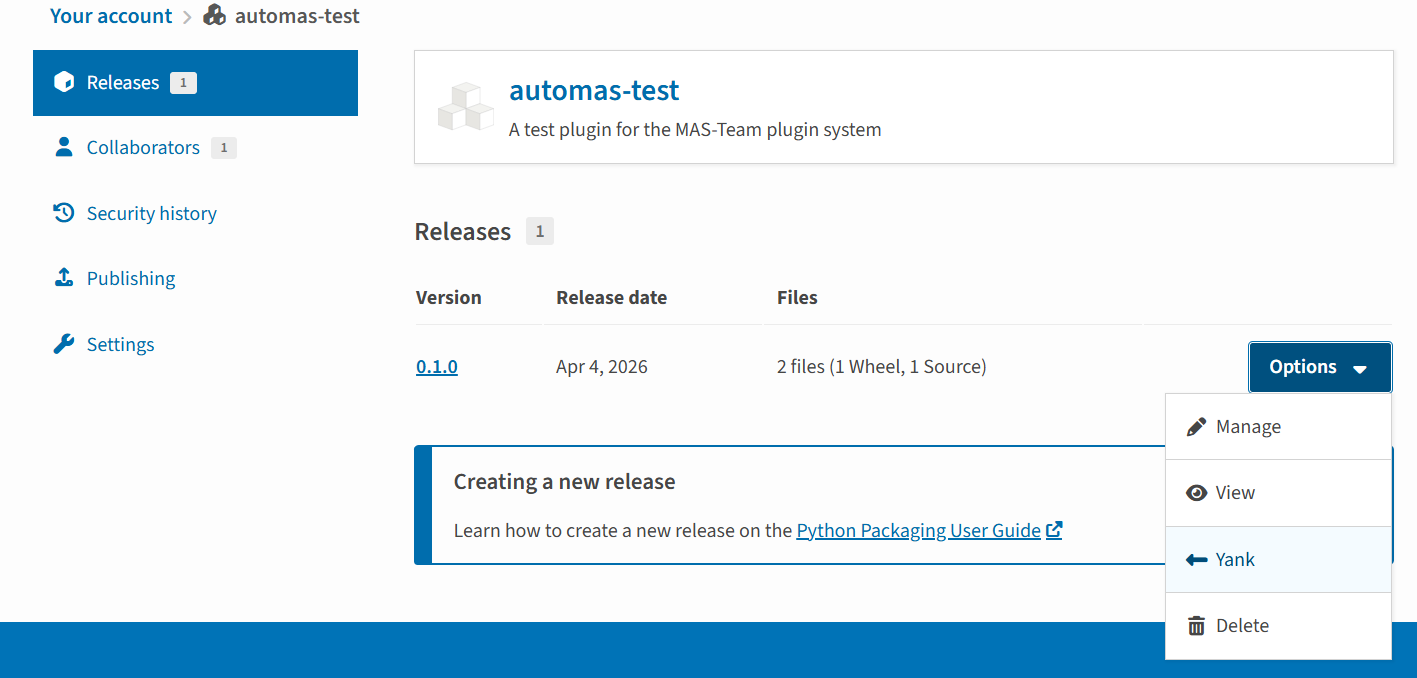
What does this do?
Yanked means the version is withdrawn:
- It applies to a specific version, not the entire package.
- It marks the version as not recommended for installation, for example because of a serious bug.
pip install:- Does not select yanked versions by default.
- Can still install a yanked version if the version is explicitly specified.
Yanking prevents accidental installation when no version is specified.
Can I delete an entire package or version?
- You can delete:
- A single release version
- Or the entire package
- But:
- It cannot be restored
- It breaks dependency chains, so it is generally not recommended
PyPI officially encourages marking versions as deprecated/yanked instead of deleting them.
Unless there is a serious supply-chain attack or malicious code, deleting directly is usually not recommended.